As of today, instructors can create Course Hub sites for lab, discussion, independent study, and other section-types that do not have Course Hub sites automatically created.
Lab/discussion Course Hub sites are not needed for the majority of courses as the lecture/seminar sites usually suffice. However, they may be useful in the following cases:
- The lab is taught by a separate instructor with its own resources and syllabus.
- You wish to create separate resources (e.g. Moodle sites) for each discussion section.
Below is a brief screen-cast describing how to create additional Course Hub sites.
[youtube 3MDnzZPjpCc 600 370]
Basic steps for adding an additional Course Hub Site:
- Go to your Course Hub dashboard.
- Click on the Manage Course Hub Sites link for a given term.
- You will see a list of all sections you are teaching in that term.
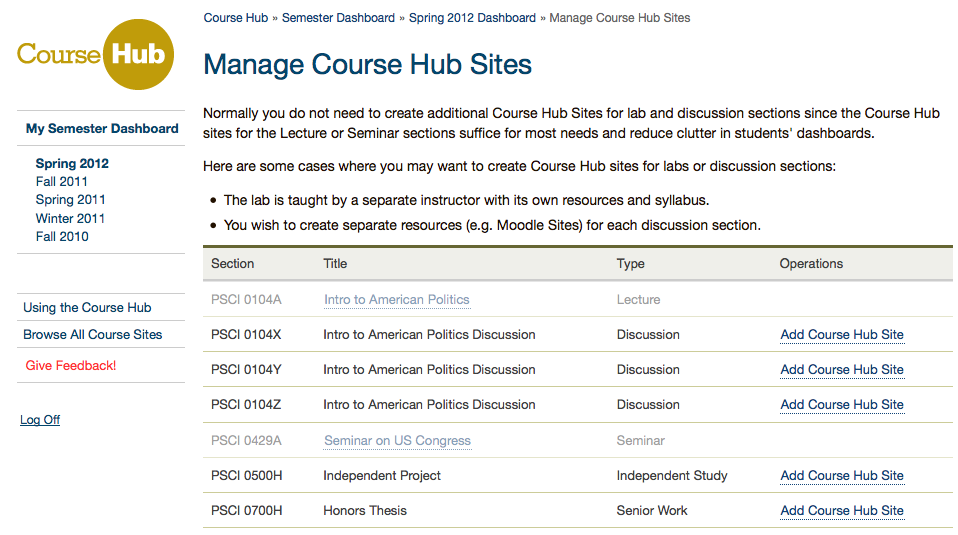
- Click the Add Course Hub Site link next to any section.
Adam, I’m glad your email today (on the topic of discussion sections) pointed us to this blog post, because a faculty member asked me about this earlier in the week. Perfect!