Category Archives: Course

MIIS

Localization Practicum – Automate 24 ways i18n method with Python

Some may say that among programming, localization-related and linguistic skills, you can’t have everything. Picking all up seems almost impossible for them. Yet, Zach, Will and I decided to put that theory to a test. We would like to integrate the knowledge we have around Python to automate some of the processes we learned about localizing websites and apps.

To automate the process, we first need to remind ourselves what 24 ways i18n is about. We’ll give you a brief intro and if you’re interested in learning more about 24 ways, click this link to check out the full tutorial on 24 ways.

About 24 ways i18n method

So about 24 ways i18n. It’s a way for you to insert translations into your website in a more dynamic manner. You might wonder: Why do we need this so-called 24ways to insert our translation? Isn’t it as simple as find the string and replace them with our translation? Unfortunately, that’s not the case.

Remember, different languages have different formats. For example, let’s say we’re managing a recipe website and there’s a recipe for a simple sandwich:

  1. 2 slices of toast
  2. 1 slice of cheese
  3. 10 slices of honey ham
  4. Some butter
  5. Some ketchup

In traditional Chinese, the recipe would be translated into:

  1. 吐司 2 片
  2. 起司 1 片
  3. 蜂蜜火腿 10 片
  4. 奶油少許
  5. 番茄醬少許

Notice something? Yes the format seems a bit different. Structures of the two languages aren’t exactly the same. That’s why instead of blindly dumping translations into our website, we need to make sure we’re dynamically updating the translation according to the actual language structure. And that’s where 24 ways i18n shine. By using 24 ways, you’re not only making LSPs’ lives easier but also preparing your business to advance to a global level.

What do we actually achieve with Python?

Other than the main function, you’ll need:

  • String.js (Storing the translation)
    (prototype ready)
  • Re-formatting/replacing the string with the _() gettext method
    e.g. “RandomText” –> _(“RandomText”)
    (still in progress)

For the semester, Zach, Will and I decided to start things off by attempting automating the string extraction process, specifically pulling from Html/XML files. Here’s the prototype file we come up with, feel free to try it out along the way. In the file, you should find the “scratch.py” Python file we wrote and the “Sample.html” file we toyed around with.

Extract strings and store them in “String.js” file with BeautifulSoup package

BeautifulSoup is a powerful package for web developers these days to process website-related information. With BeautifulSoup, you can have Python reads HTML files, filters out tags as needed or finding strings within a specific type of tag.

Here’s a quick sneak peek of what our program looks like:

scratch.py in Pycharm

And here’s what the sample HTML looks like:

Sample.html

With the power of BeautifulSoup (Specifically, the “get_text()” and “prettify()” method), we successfully extract and store the string into our target – the “String.js” file. On top of that, we also provide our user with a “demofile1.txt” file to help them visualize what the file looks like without tags:

Along the way, we also realize that with BeautifulSoup comes a significant amount of possibilities. We’re merely scratching the surface here. Combining with packages like “urllib“, you’ll be able to pull info straight from the Internet!

Take a step further?

In our weekly discussions, we also have our focus on topics like execution of the program with bash scripts, and localization best practices such as duplicating source files in case of messing up. With the time and knowledge we have right now, we succeed in achieving some but not all. You can find out more about what we achieve in our Python program. They are stored as comments in the program since they don’t exactly contribute to our main goals – 24 ways or _() gettext method.

One thing worth mentioning is that we successfully incorporated some basic level of GUI(Graphical User Interface) features in our program. With the tkinter package, our users can run the program -> select the file via GUI -> get the same result! That sounds amazing, isn’t it?

Here’s the updated Python program.

After incorporating tkinter, we have GUI now!

What’s next?

It’s clear that we’re far from done, but as our graduation approaches, we have no choice but to wrap up what we have for now and perhaps pass on what we’ve achieved to our colleagues who might be interested in taking over our project next year.

Here are what we have achieved so far, open for improvement though:

  • Basic GUI (tkinter)
  • Strings extraction (BeautifulSoup)
  • “String.js” file prep
  • Duplicate files capability

And moving forward, some suggestions on what the goals could be for our future colleagues:

  • Re-format the strings with the _()gettext method using Regex (perhaps like this? ” _\(“(.*)”\)” )
  • Optimize the overall program, QA for potential bugs
  • Come up with an i18n guide to help streamline the string extraction process
    (Some people build their website like building Frankenstein, thus makes it almost impossible to pull the strings properly)
  • See if we can integrate everything we have and fully automate the 24 ways i18n process

Overall speaking, I have a blast working on this project. Plus, my colleagues, Zach and Will, are highly competent in working with Python. We’re able to exchange ideas and feedback all the time. With ideas flying around, we’re able to come up with possible workarounds that we might have never thought of ourselves. Eventually, it leads to the fruitful results we have here.

Here we have a video presentation to help you visualize what we’ve achieved today:

Link to our video presentation

GameMaker Studio 2 hands-on experience

After getting our hands-on experience with a variety of apps and game engines, I decided to team up with Daniel and Meng to explore a game engine we found online called “GameMaker Studio 2“.

About GameMaker Studio 2

To give you a brief intro: GameMaker Studio 2 is a game engine developed by YoYo Games Ltd. It’s a cross-platform engine so you can make games for Windows, Mac, mobile devices or even gaming consoles like Nintendo Switch! You can find a huge community for this engine. On top of that, there’s a sufficient amount of tutorials and support documents on the website. As a new game maker, you should be able to find the support you need on the website with ease. Sadly though, the engine is not free, but you can get a 30-day trial before purchasing the actual licenses.

The main feature about GameMaker Studio2 is that there’re two ways to make games:

  • DnD (Drag and Drop) method:
    This method is recommended to people who have the passion to make games but doesn’t have the extensive coding knowledge. Via this method, you can rely more on the graphical UI to program the game for you. As long as you have the idea, you can make it a reality.
    (My buddy Daniel has some deeper insight on this method so go ahead if you’re interested in learning more about the DnD method)

  • GML (GameMaker Language) method:
    It might sound intimidating but to put it in simple words, it’s just the same UI but without the Graphical elements. You have to go back to your root – do the coding/programming yourself. As for the language itself, you should feel at home if you have previously learned a programming language before. Just like any other programming language(javascript, Python, html, etc.) out there, the overarching logic is pretty much the same. It’s just that there’re several teeny-tiny bits of differences here and there. As a TLM student, you should be able to pick up GML(at least the basics…) real fast after reading the documentation.

Let’s talk about how to “actually” localize game in GameMaker Studios 2 via the GML method…

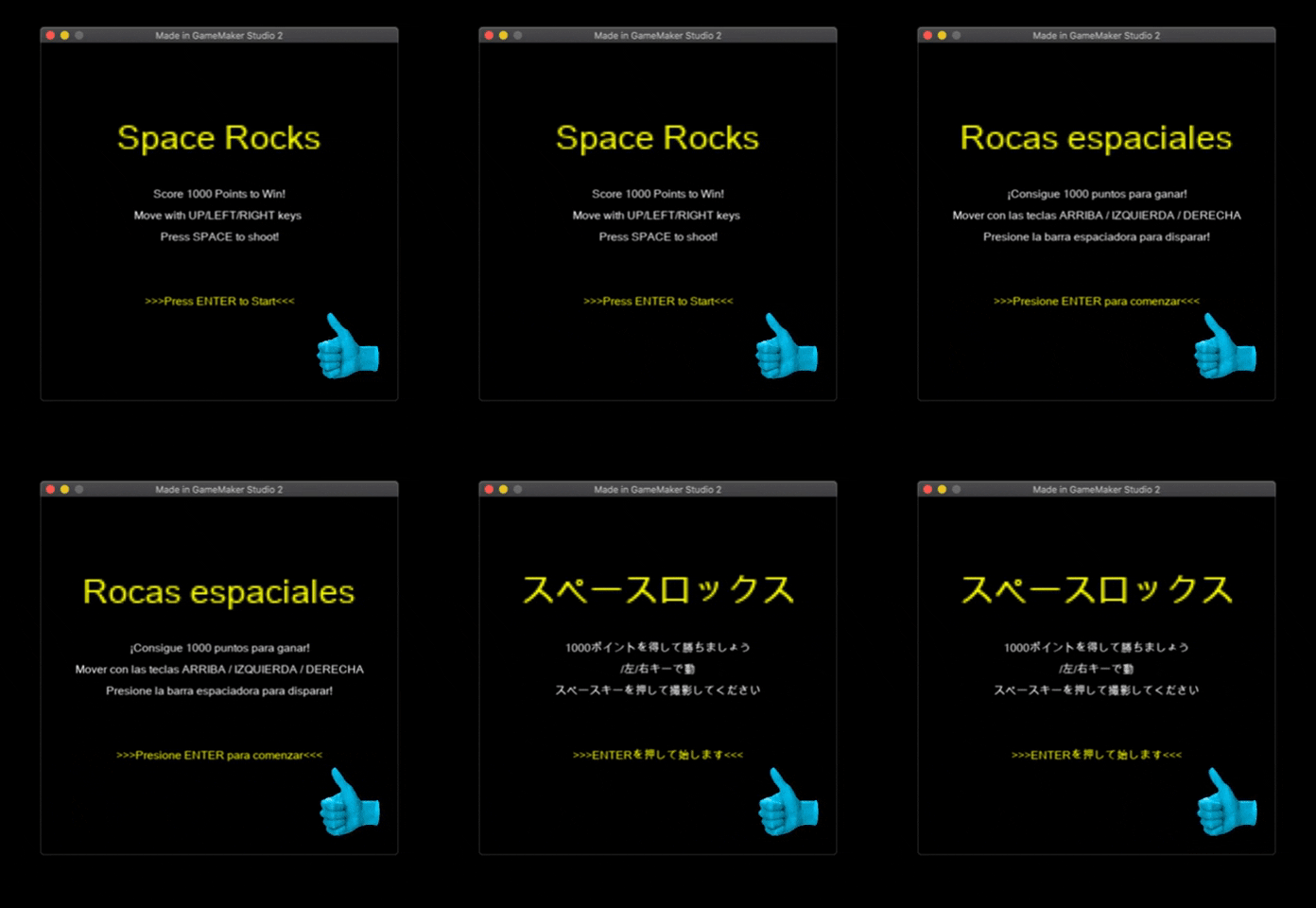
So here we have a sample game to demonstrate: Space Rocks
If you follow the tutorial online, you should be able to make one yourself!

Space Rocks

So the idea I have is pretty similar to Javascript i18n “24 ways”. For GameMaker Studio 2 though, we’re going to be using json files instead of javascript. Here’s a quick concept map of how am I going to localize games in GameMaker Studio 2 using the GML method:

To localize games in GameMaker Studio 2 via the GML method…
  1. Create functions to handle linguistic assets.
  2. Wrap the translatable strings with the function.
  3. Create another function to manage the file.
  4. Holding the string in json files
  5. Create a function to cycle the language(or create a language picker if you prefer.
  6. That’s it!

Here we go!

For details on the actual functions and language manager file, I recommend you checking out this Multilingual game tutorial guide by YawningDad on Youtube. This video tutorial helps me out a lot during the research phase. Without his clear explanation of how everything works together in GameMaker Studio 2, I wouldn’t have been able to make this happen.

Alright, now you need to wrap your strings just as you would with JavaScript 24 ways. Here’s a quick sample of your game files before & after you wrap the strings with the function:

Then, you need to create json files to hold all the actual text which are now wrapped by our functions. In the json file, there’re two rules you need to follow.
You need to…

  • Declare the language for the file.
  • Pair up the correct strings and variables

And this is what the json file should look like:

We’re almost there. Now we just need to add an event (or a dropdown menu) to choose the language we want. To do so, all you need is to add an event in the game object to call the cycle language function. In this case, we’ll use the key “L” as our language switcher.

Press “L” to switch your language

That’s it. Now it’s time to run your game!

Careful! Font and Unicode issue

One thing to remind you is that you might need to check your font setting if there’s accent (á, é, í, ó, ú, ü, ñ, ¿, ¡… ) or CCJK characters involved. Your text might not display properly if you don’t have your font setting on point.

Here’s how to fix the issue:

  • First, you need to check the font and see if it’s Unicode supported. Some fonts do not support characters out of their own locale. If that’s the case, you might have to use a different font instead.
  • In GameMaker Studio 2, you can select what characters to use in your font setting. For most Romance language, characters range from 32 ~ 255 within the ASCII table should get you covered. As for CCJK, you have to look them up on the Internet and catch them as specific as possible.

    Why not just select a huge, random range like 1 ~ 1000000000?
    Well, that wouldn’t work cause it’s gonna create a huge file and that would cause performance issues. Plus, GameMaker Studio 2 would have to compress the font file to make sure the font loads. Even if you actually get the characters selected, the characters still would not display as it should be because they’re compressed.

Success!!!

Congrats!! Now you know how to localize aa game in GameMaker Studio 2. Of course, there are definitely rooms for improvement for the code. But for now, you should give yourself a pat on the back for your success on localizing a game in GameMaker Studio 2! Yeah!

Terminology Management

Term v.s. General Language?

A termbase without proper filters would be more of a disaster than help for the linguists and would occur more time and money waste on validating the false flags within the actual translation.

Sometimes it can be hard to differentiate what is the so-called “term” and general language that doesn’t belong to the terminology category.

Q : Does the word have to be super complicated to be considered as a term?
A : No. Absolutely not.

Then what exactly makes a word, a phrase or a string of words a term?
In fact, terms are defined based on the uniqueness within a specific domain. On top of that, we also need to consider the form and actual meaning of the term. As terminologists, we need to standardize these types of information so that the people within or out of the professional circle can easily get the gist of what they need to comprehend in the shortest amount of time possible and to help increase the working efficiency of the linguists.

With the knowledge of what defines a term, terminologists usually need to cooperate with subject matter experts to ensure that the termbase they forward to the linguist are solid and error-free on a regular base. With the subject matter expert proposing the term candidates and terminologists providing their professional insights on the term. Afterward, there’s also a call for regular updates and cleanups to do with the termbase.

There are many ways to create a termbase:

  • Excel/Google sheet can get the job done.
  • Applications such as SDL Multiterm can help to create and manage a termbase within the same ecosystem.
  • Most of the CAT tools available like Memsource also have built-in termbase feature at your disposal.

And the types of information to be included in the termbase:

  • Domain
  • Languages
  • Form (Fullform/Acronym)
  • Context for reference

Of course, you can get more specific with each entry, but it might get hectic so you want to make sure you have the appropriate amount of information included in the termbase otherwise it would be overwhelming for the linguist to actually integrate the termbase into their CAT tools.

In this class, we’ve worked with WIPO (World Intellectual Property Organization) termbase management and we also took some time study the influence of terminology have upon the real-life translation/localization industry.

Advanced Localization Management

Expanding on what we’ve learned in the Localization Project Management class, we get more hands-on experience about localization project management.

Hands-On Experience Recreating PDF File in Microsoft Word

As you may know, PDF files are not really compatible with CAT tools. Most PMs and linguists prefer working with Microsoft Word instead of PDF. CAT tools can’t really handle PDF files and usually the format of the exported files would be off.

In most cases, the client that requested the service should have the original file in Microsoft Word format because the PDF files are more often than not originated from Microsoft Word. But what if the client for some reason refuse to provide the original file or doesn’t have access to the Word document? Well, as a PM, you got to do what has to be done for the sake of the project – recreate the PDF in Microsoft Word.

In general, most PDF requested that needed recreations are forms or questionnaires. Format in these type of documents are must-have and can’t be neglected. There might not be many contexts within these type of documents, but the efforts invested are undoubtedly high.

Here’s one of my three hands-on experience with recreating PDF in Word:

Non-Disclosure Agreement (NDA) and Legal Documents

We also looked into the elements of the common legal documents within the industry and learn how to draft one ourselves.

NDA

NDA is a mutual agreement between at least two parties on which information is considered to be confidential, how are we going to protect the information and what is the possible consequences for breaking the NDA.

For our program, we have yet to establish an NDA for the incoming students. That’s the reason why we, together with our professor, decide to draft an NDA for the program to make the program even better.

In short, there are two major step to draft a NDA:

The first step would be identifying who the stakeholders are for this NDA. Obviously, we must have the student and school authorities. On top of that, we may also consider people like guest speakers to be part of the stakeholder as well because they share their knowledge with us.

The second step, which is the most important part, is to define what confidential information is and a brief of the consequence of breaking the deal. For this part, you need to have close discussions with the one another because this is the most crucial aspect of NDA.

Wanna check out our class’s final NDA? Click Here

Handoff in Real Life

We’re not perfect, sometimes you or your colleagues might not be able to complete the whole job. Family, health or even your work can be a part of the reason. That’s why sometimes we need to take over others’ work or pass our work to them. Which is exactly what “handoff” is all about.

“Handoff” refers to a state where you transfer the work to someone else who is willing or supposed to take over the task from where you left off.    

In the LPM class, we assume that we’re in a perfect world and everyone can dedicate themselves 100% to the project. In this class, we spice things up a bit. We assume that the team of the company is constantly switching their roles with one another, and they hardly work on the same project every week. To be honest, it was kind of intimidating at first, In certain cases, taking over others’ works can be disastrous. However, if you have systematic hands-off mechanisms inherited by all your colleagues, passing or taking over projects can be as smooth as butter.

What Defines A Good “Handoff”?

To perform a good handoff, we can start with pinpoint what exactly contributes to a so-called good handoff.

First off, an organized folder packed with clear directory to the work documents is a must-have. Who would want to deal with a mess in the first place?A messy structure intimidates peoples and would result in unnecessary waste of time and money due to the extra work of figuring things out.

Secondly, a streamlined process management system can be a saving grace to you and your colleagues. If everyone can keep track of their work in the system. People taking over can refer to the system for guidance pretty easily.

Lastly, which circle back to ourselves, be open for any query. Communication is the key. No matter how meticulous you are preping your handoff, there can always be, either obvious or unexpected, query from your colleagues. Try to be there when your teammates need you, this positive vibe can be a great addition to you and your team on the long run.

For more details of our work, please visit our “company’s website”

Final Big TakeAway – Drafting our own Code of Ethics for LPM

Code of Ethics is a series of guidances or principles for a certain business professions. In my opinion, drafting a code of ehics requires solid understanding of the industry to come up with these standards in it. With the lead of our professor and the review of our colleagues. Each one of us come up with our own code of ethics that reflects our visions and hopes for the industry.

I really enjoy getting to know more about this evolving industry. To me, the code of ethics is like a milestone of my career of LPM and I would like to share with everyone.

Multimedia Desktop Publishing and A/V localization

Final Project – Converting PDF to EPUB + Localizing it into Traditional Chinese

Here’s a short comic I decide to work with for the final project.

I expect some try-and-error along the way so I pick a comparably more simple material to work with to save myself from being overwhelmed.

Fixed layout EPUB is best suited for graphic books like this short comic. However, fixed layout EPUB lacks the reflowable experience that differentiates itself from PDF. Nonetheless, exporting it in reflowable or fixed layout format both require you to recreate it inDesign. After recreation, it’s. just a matter of choosing which export option you want to go with. Plus, most CAT tools support inDesign (indd files).

Here’s the final EPUB file I recreated

Recreating your PDF in inDesign for localization and reusability

There are online converters that can help you, but not with this comic filled with images. The format would be off and part of the images would be distorted. As a result, we need to re-create comic and export it into EPUB in inDesign.

Recreating Graphics

During the recreation process, we need Illustrator and Acrobat Reader in addition to inDesign to capture reusable graphics and populating the content. We first need to export each page as a separate file in Acrobat Reader and then import them into inDesign as references.

The individual pages can also be used for other purposes. We can use them to capture graphics in Illustrator and then import them into inDesign.

(I extract the Chinese logo from the official websites because recreation of the logo would require specific fonts and certain advanced features of Illustrator. The one I created looks awful and I don’t even dare to look at it myself. Oh my! I definitely need more practice and knowledge for this.)

Recreating Text

Compared to graphics, the text is easier to recreate. You can either copy it from Illustrator or Acrobat Reader. Or if it’s durable, you can create a textbox and type them in manually. What’s better is that most CAT tools support indd file. When you complete recreating your file, you can translate the context using your own CAT tools. Isn’t that amazing?

QR Code feature in inDesign

There’s a built-in feature in inDesign for you to create a QR code with ease. You select a blank frame and go to “Object” tab and select “Generate QR Code”. In the wizard, you can select to generate a QR code that links to all kinds of things such as websites, files or even specific page within the same project.

Background Music Issue

I’ve also insert a background music to my ebook. However, it wasn’t that easy as I thought.

I have three goals with the BGM. I want it to play on load, repeat, and finally play across pages. I insert the audio in inDesign. Then I adjust the media and overlay settings but everything just works against my will. Plus there’s a tedious play button on the screen. Yikes!! ?

Extreme time calls for extreme method. I have no other options but to hack into the html to fix the issue manually. Luckily, I found this guide and on p.69 (no joke) I find a perfect solution to fix all my issue with one line of code

<audio epub:type=”ibooks:soundtrack” src=”../Audio/Overwatch_theme.mp3″>
</audio>

Extra! Using Sigil to Make/Edit an Ebook

Although we can simply export the EPUB straight from inDesign, here I’d like to shed a light on you (and my future self) on how to use Sigil to edit/create an EPUB.

Each page is an individual xhtml file, you can edit them with the features provided in Sigil. With the knowledge to html, you can take a step further – edit the content directly in the html editor.

You can also adjust the order with Sigil by dragging them up & down. That’s how I move to the credit page to the end.

Remember to use the metadata editor to populate the metadata!
There’s a list of default metadata categories to choose from. You can add them in and edit them in this editor.

Add a Cover and Table of Content (TOC)
In the original file, there’s no TOC page. However, ddding in cover and TOC can be a great addition to your EPUB to make it more formal and professional. That’s why I had the TOC page.

To be fair, the processes for both are fairly simple. Just go to the “Tool” tab and choose “Add Cover” and “Table of Content”. The system would automatically add in pages with the corresponding names with them.

Overall, the recreation process isn’t as complicated as I was expected. With the help of Illustrator and Acrobat Reader, you can take a step further by creating reusable objects for different purposes. Translators and designers can work directly with the object instead of going through the extra works. This practice is definitely beneficial for you and you companies on the long run.

Advanced CAT

After acquire the basic knowledge of CAT tools such as SDL Trados, MemoQ, Memsource, etc. Let’s take a step further into some of the advanced features hidden within the system and some real-world practice related to CAT tools such as training machine translation engine.

Alright, let’s start with my experience training an Statistical Machine Translation (SMT) engine!

First, let’s clarify what Statistical Machine translation (SMT) is.

SMT is a type of machine translation that is based on a large amount of bilingual text corpora.

The system would first build up a translation model by analyzing the corpora, and then perform the translation task using the same model.

Me

The above is my general interpretation of what SMT is, you may click here if you want to learn more about SMT.

Now that we get that out of the way, time to discuss about the three fundamental elements of technology translation:


Wooten, Adam. “SMT Training.” Advanced CAT.

Fully automated, high quality and unrestricted and the three goals that we aim to achieve regarding technology translation including machine translation. For now, we’re not yet able to achieve the perfect goal but we’re able to achieve either two out of the three.

SMT focuses more on fully automated and high-quality aspects. Which means if we want to succeed in building a robust SMT engine, we need to work with a more controlled language such as manual descriptions or recipes. The context within those documents is usually repetitive which is ideal for SMT training.

Think about it this way, if you want to train a new cook to make Japanese cuisine, specifically sushi, for you. What would you do?

Are you going to tell him/her to read the Constitution to learn how to make sushi? No, because legal documents are less relevant to sushi. You probably will give him/her documents that are at least related to cooking such as recipes and guides. In that way, he/she can actually learn something about cooking and improve upon it.

“Confused Chef.” Bespoke, www.bespokehomedesign.com/blog/remodel-home-renovation-journey-part-3/attachment/confused-cook-or-chef-baking-a-cake-fotolia_76046078_xs/.

After we settle down what the actual domain is, let’s figure out what type of cooking data should we be handing to the cook? American cuisine recipes, Chinese cuisine recipes or French cuisine recipes? Well, they might help the cook to get a better grip on general cooking techniques but still can’t efficiently educate our cook on how to make sushi.

You’re probably shouting at this point, “I get it. Give the cook Japanese cuisine recipes, specifically the sushi recipes!!!” That’s the spirit, but what if we take a step further and provide recipes written by the same master chef? Would our rookie cook be able to learn faster because of the similar formats and thought processes generated by the same individual? Pretty likely. Our rookie cook can definitely benefit from not needing to re-learn everything from the ground up and keep on populating the knowledge model without interruption.

There you have it. That’s exactly why we prefer working with more restricted text when training SMT engine so that we can get a higher BLEU score for our SMT engine.
*BLEU (bilingual evaluation understudy) is an algorithm for evaluating the quality of text which has been machine-translated from one natural language to another. There’s no set standard to tell if it’s good or bad, only if it’s relatively better or worst.

My group members Josue, Cody, Meng, and Chen-ye and I decided to train an en-us <-> zh-cn engine based on Sony PlayStation manuals, and the Microsoft Azura is the platform we used. First, we need to harness and separate our data into three different categories – Testing, tuning and training data.

  • Training Data: Your engine is going to create a translation model based on these data. Minimum segments required is about 2000
  • Tuning Data: Extra information that your engine can refer to in order to provide a more accurate translation. Roughly about 500 segments
  • Testing Data: Data used to evaluate your engine. Think of it as a test with answers and training data as a student’s answer. Roughly 500 segments as well.

Due to the limits of available data and file formats, we decided to have PS4 manuals as testing data since it’s standardized, PS Vitas as tuning data cause it’s still relevant in some parts of the world and lastly PS TV as training data.

We’ve encountered issues such as google sheets not accepted by Azura and unclear error messages. We had to download our aligned data from google sheets and convert them into actual excel formats, otherwise, Azura is going to reject them. Also, we were constantly reaching out to Microsoft for possible solutions.

Here are our Final presentation and our finalized proposal for this pilot project.

CAT Tools Tips and others
(Regular expressions, Handy utility tools)

Project Fluent

In this class, we take a look at a localization system called project Fluent. Unlike traditional localization, translators can refer to the complete context directly, not just piecemeal context. Plus, there’s a dynamic live preview of the localized content in project Fluent.

In the past, people extract and separate the content for translation because translators might mess up the code. Or maybe the code is still under construction but the prompts are set. Either way, people now can have a different option to localize their content. Here’s a quick demonstration of me adding a basic language selector for the login prompt and a different level of your feeling toward the post.

Project Fluent

Regular Expression

In your CAT tools QA system, you can input coding languages to catch errors regardless of the actual context. Regex101 is a handy website where you can test out your guide with quick references on your side.

Here are some samples I come up with for English(en-us) and my mother tongue traditional Chinese(zh-tw):

  • \, -> \,:
    Change the half-width punctuation to full-width punctuation for traditional Chinese.
  • (\d{2})\:(\d{2}) -> (\d{2})\點(\d{2})\分 :
    Change the time format into traditional Chinese format
  • (\d{3})\-(\d{3})\-(\d{4}) -> \+1\((\d{3})\)(\d{3})\-(\d{4}) :
    Change the phone number format into traditional Chinese format.
  • \$(\d{1,}) -> (\d{1,})\美元 :
    Change the currency format into traditional Chinese format.
  • \S[^,]+\,? -> …$4 $3 $2 $1 :
    Change the address format into traditional Chinese format.

Utility tools

The tools we’re discussing here are not limited to localization and translation. In fact, the tools can be really useful for most people from different background.

Screen magnifier is a great example and one big takeaway for me in this course. Sometimes, when we’re giving a presentation or meeting, we might want to magnify part of the screen to explain our point more clearly.

For me, I decide to take a look at a tool name Renamer Portable. It’s an app that can rename multiple files at once instead of you clicking through each file one by one. Here’s a utility demo video I made for Renamer Portable.

Translation crowdsourcing

Translation crowdsourcing. What does it mean?

Think of it this way:

It’s a different take on machine translation. For machine translation, we have computers handle the huge amount of translation tasks for us. As for translation crowdsourcing, we are basically replacing the computer with a huge amount of contributors and have them do the same translation tasks for us.   

Is it better than machine translation? Perhaps, depends on how you execute the project. If you do it right, you can get a better translation results than you expected. Plus, use the translation memory to train your machine translation. Get two birds with one Stone!

However, if you approach translation crowdsourcing in the wrong way, it can be a huge disaster. You may be throwing the same amount of money into the water because nobody contributes to your project. Oh No!

I will share with you more of my insights into translation crowdsourcing.
But first, let me introduce you to a board game company and I promise it will help us on this journey to explore more about translation crowdsourcing. 


AVALON HILL
An entrepreneur of the cooperative strategy board game today has established its foothold in the modern market despite the fact that video games have revolutionized the conventional way of entertainment…


If you are someone who likes board game, then you definitely heard of the name. People are crazy over their games such as Betrayal at the House on the Hill, and I’m no exception.

However, to remain strong and competitive within the market, I would suggest Avalon Hill consider the possibilities of community translation to increase their exposure to the public and expand their business into the localization industry.

There are several reasons why I would recommend Avalon Hill to expand the business territory into translation crowdsourcing:

    One is that their games are some popular that people who live on the other side of the planet also support their games passionately.
    The second reason is that most of their produced games are heavily plot-driven, so the market for selling the localized version of the games is already out there.
    The final reason is that by providing the localized scripts, we can attract more players or customers to expand the community even further with the more immersive experience that wasn’t possible without the aid of translation crowdsourcing.

Even though, there are two rubrics that we need to look out for before we initiate the translation crowdsourcing to ensure that the outcome would be successful instead of a failure.


“Quantity”

Without a sufficient amount of support from the community or the crowd. the project would be stuck and cause more expenses and disturbance to both the community and the developer.

To prevent that from happening, we need to motivate the crowd/community.

The first thing to consider is to create a simple but solid translation UI for the contributors to submit their work. The overcomplicated user interface would easily demotivate your community to contribute.

Also, create a clear communication channel between developers and contributors so that developer can receive and react to users’ complains or feedbacks while the contributors can get helpful insights or instructions related to their tasks at hand within a reasonable amount of time.

Lastly, create a sort of clout indicator for the contributors so that they can easily tell if they are causing an impact on the project. More often than not, contributors or volunteers get burnt out because of this particular reason. No matter how much efforts or thoughts they spent on the project, people can hardly tell what sorts of impact they have on the project. Again and again, they just give up on contributing because it feels like their efforts are never cherish in the first place.


“Quality”

Since we are asking for help from the crowd, we need to spend extra time and efforts on reviewing the translation because not everyone is a professional translator and there might be discrepancy everywhere.

People often have misunderstandings such as community translation is totally free for the administrator. They assume that all the administrators have to do is hand out the task like elementary school teachers and collect the results after the community complete the translation. That is definitely not true.

Instead, The amount of investment pretty much equals the amount spent on hiring professional translators to do the job.

First, we can create a style guide to inform the contributors of what type of tones or taboos we should look out for this project if possible, or we can provide them with our TM and TB without the privilege of re-writing any of the data.

Then, we can implement a cross-review/voting system to ensure the quality of the translation. Since the community is providing the services volunteerily, we can’t really vet each of the contributors, nor are we going to walk them through a series of meticulous recruiting and onboarding process. Thus, we need to make up for our QA in a different way.

In addition to the cross-review/voting system mentioned earlier, we still need to hire professional language service providers to review the works of the crowd for us before we publish the work.


Final Project

For the final project of this course, I decided to integrate my love for Avalon Hill‘s board game and the Knowledge I’ve learned in this course together.

In the past, my friends and I often had to purchase an extra translation pack from an agent so that my friends who are not familiar with English can also enjoy the game.

Generally speaking, the translation pack costs nearly as much as the original game but the quality of the translation may not be as good as we expected. Sometimes the quality of the translation can be hideous because the agents who provide the translation are not official agents of Avalon Hill.

Later on, we found out that some of the board game communities in my area provide a better and more authentic translation than some of these agents. Although there might be some error here and there, the overall translation is still pretty solid.

This experience inspires me to come up with this translation crowdsourcing proposal for Avalon Hill. I believe that if it can be executed properly, both the community and the company itself can benefit from a project like this.

Here are the links to:
Presentation
Video Presentation
Proposal for the translation crowdsourcing project


Translation Management System

As CAT tools are slowly but surely starting to create a new phenomenon in the translation/localization industry, administrators of the business also begin to pick up new tools to manage their companies more efficiently than ever. One of the many is a tool that enables project managers ( PMs ) to manage every stage of the process within one simple software. Which we often refer to as a Translation Management System ( TMS ) .

TMS is not just a messaging application. It is a software that usually integrates 4 essential aspects of a translation business:

  1. Client Management
  2. Linguistic
  3. Project Management
  4. Vendor Management

In the past, there was no software capable of covering all 4 aspects at once. As a result, PMs often need to use multiple different software to make up for the shortage of each software. Which sometimes results in the PMs getting burnt out or muddled because they must switch among different software just for one project, let alone peak season when there’s there a huge amount of projects pouring in.

Let’s discuss each aspect and how TMS helps to improve the lives of PMs separately, 

Client Management

Managing the relationship with your clients can be hectic if the only resource you have is a non-categorized folder or a scattered pile of client data.

There are generally three overarching requirements:

  • Streamlining system – invoice & estimates & communication
  • Client Portal
  • Client data storage

For PMs, having a client data base can definitely enhance the working efficiency when it comes it keep track of the background and related information of your clients.

Also, being able to create a project overview or invoice without hopping on and off different software can secure the data from leaking, speed up the process and create a standardized format for the ease of launching future projects.   

Many of the PMs suffer from the lack of streamlined tools that helps them create invoices for their clients. A lot of the time, they need to use an off -the-shelf application such as Microsoft Quickbook to do so. Fortunately, TMS developers notice the demand and have started to implement such application into their own TMS. 

Client portal basically refers to a way for the client to submit their files or receive the invoice and estimates straight from the PM. It excels at avoiding the risk of leaking any classified information for using a non-secured, public network and software. With client portal, the crucial information can be protected and also make it easier for both sides to manage these informations without going through endless amount of e-mails or documents. Also, it should be able of providing a solid communication channel for both PMs and the clients whenever there’s a call for information exchange. 

Lastly, the most basic but also the most important features of all, you can create a database of your client. In that way, managing and updating client data can be simple as a flip of the hand. Plus, you can group clients in similar domains and make it even easier for future marketing.

Linguistic

There are plenty of CAT tools out there. What if there’s built-in or collaborative CAT tools within the TMS? Wouldn’t that make your lives as a PM or a linguist much easier?

Fortunately, that’s exactly what our focus is regarding the linguistic aspect of TMS. 

Different TMSs have different approaches toward linguistic aspect of their system. Some create a whole new CAT tool from the ground up and import it into their own system, others try to connect an already existed CAT tool to their system using application programming interface ( API ) .

API is a set of functions that connects different software, systems or services. To put it in plain words, it allows you to get all your tools working in one software. Isn’t that just a dream come true when you don’t need to hop on and off multiple software?

However, there’re more to inspect in addition to the mentioned above. We ought to check out the actual capability of the translation workbench of whatever CAT tools you decide to go with in the end. Sometimes workbench with limited functions can be hideous to the linguist and would affect the quality of the translation work, or sometimes it might be the direct opposite when the workbench is just too complicated to figure out. Both ends are not ideal to a good TMS and that’s why we need to take in consideration of the linguist aspect when discussing about TMS.

Project Management  

Not all TMS has yet to cover all four aspects of translation business, some might just cover two out of the four aspects and that’s totally understandable. Nonetheless, all TMS should at least have some sorts of project management features to earn them the title as a TMS. Otherwise, they should be put into other categories like CAT tools instead of TMS.

Project management can be overwhelming sometimes, so having a robust, legit system to categorize, standardize and keep track of projects can be a huge blessing for the PMs.

As for what exactly project management is, project management covers basically all the administrative works you can think of such as creating workflow, assigning tasks and analyzing/tracking reports/data. In the past, PMs have to approach these tasks in conventional ways and there can be a high chance of occurring mistakes or issues. With the help of TMS, we can finally lower the intensity and simplified the tasks of project management. On top of that, we can take advantage of the system to provide us with visualized and detailed graphics/reports to leverage our work.

Vendor Management

While managing the clients of your company, don’t forget to manage the talents that collaborate with your company as well. Having both lists ready can enhance the performance as a PM greatly.

Overall, the criteria for vendor management overlap with what we have for client management. They both shared the same goals:

  • To create a clear, well-organized list of stakeholders who are involved in the projects.    
  • To secure a well-established communication method for both ends.

Sometimes a TMS would mix vendor and client management together into a single user management interface. In my opinion, it’s fine to follow this approach. One concern I have is that whether there’s customizable options to group certain users or not.

More often than not, searching for a specific user can be a nightmare if all you have is a long list of users without any index. That’s why me personally favor separating the two more than mixing them up together.  

Put in practice…

After taking this course, My colleges and I form a team of 5 and together we review several TMSs in the market and give constructive feedback to an anonymous client.  

Specifically, we checked out a TMS named XTM and it was a blast. However, we realized that all the TMS we looked at are great but each of them gets their own individual flaws. Take XTM for example, we found out that the lack of a streamlined invoicing system really hurt its overall performance results to the client. Nonetheless, it is still a great TMS in our opinion.

To me, TMS is like a young child with great potential. Although TMS still gets a long way ahead, I have faith that someday it would affect the market phenomenally. If we can nurture it with improvements, it can definitely make its entrance to the world someday in the future.

Here’s the link to the comparison sheet we made for the whole project
And the link to the presentation we made for our review on XTM

Talent Management

While L10n Project management gives an overview of the whole process when working as a PM.

Talent Management gives us a chance to have a closer look into the part where we recruit our talent right before the actual translation stage.

Finding the right talent for the right job can be really tricky if you don’t have well-organized recruitment insights or regulations. Fortunately, that’s what we’re learning in this course. A lot of the companies today, not just LSPs, don’t have an SOP for recruitment, which results in numerous chaos and recruiting under-performing talents. To optimize the performance and productivity of the company, we want to ensure that the investment we made on searching for talents is worthwhile. To do that, we would want to standardize the talent onboarding process. Having a set of rules can improve the working efficiency of the HRs and clarify any queries from candidates or HRs themselves.

*Class Notes : Explicit demonstration of “Talent Management”

Process Street is the tool we used to create an explicit talent onboarding templates for HRs. It’s a platform that requires less technical backgrounds for your team to create a powerful, API(Application Program Interface) driven workflows. It’s like an e-version checklist templates that you can use for multiple projects.

*Process Street

First, we learn about what a standardized process should be like in class, and then we apply the knowledge we just acquired into creating a checklist on the platform. In general, we can split the whole process into Screening, Contact, and Evaluation stage:

Screening

Let’s say if you’re looking for a laptop, you’re not likely to be walking into every store you confront and ask the staffs if there is any good laptop there. You’re more likely to be doing some research on which specific one are you looking for before hands based on the functions, applications, platforms, etc. Eventually, you’ll find the ideal one for your need. Then you contact the seller and make the purchase. BAM! laptop GET!

That’s exactly what screening is all about. First, you create a list of criteria that you’re company want from your talents, then you start looking for your potential talents based on this list. In that way, you’re less likely going to waste your time and efforts on the wrong talents while the perfect match is just right there waving at you.

Contact

Finding a good match is a great start, and now you’ll start to make contact with your talent.

In some occasions, the talent might be the apple of your eyes, but you, on the other hand, might not be their best bet in their hand. Also, don’t forget that you might be scammed, which is one of the many factors that might a disappointment to either side.

To make sure that both you and you’re talents are satisfied with the deal, you as a talent manager should start gathering some more information about your talent from your talent directly and introduce your deal to your talent clearly.

You can do so by :

  1. Create a questionnaire about their specializations and any other crucial information to the job.
  2. Request diplomas, CVs or any kind of certificates.
  3. Request references.
  4. Ask the potential talent to take a test created by your company, It should include tests of certain abilities that your company expects from your potential clients.

During this stage, you can test for any abilities you expect from future co-workers such as whether they’re able to follow style guide or not, can they submit files in the requested format and careful they are when approaching they job

Evaluation

Now that you’ve gathered all the information necessary, it’s time to make your final decision.

Upon receiving all the requesting information from your talent, it’s time to work. You shall start looking into the information provided and assess their performance based on their test results and related documents. Then, apply those assessments to a pre-made scorecard. If the talent passes the assessment, then we shall notify them and start the onboarding process.

However, if the talent fails the assessment, don’t throw their files out of the window on spot. Most importantly, DON’T GHOST THEM. Send them a follow-up message and perhaps explain the reasoning behind your decisions, or even tell them which aspects should they be improving upon. Show the talents that you care for them, you’re not just another machine. If they get potential, archive their profile into your talent database. They might not yet be ready now, but you never know. Perhaps in the near future, you’ll get yourself a well-prepared talent who improve themselves by a lot thanks to your attentive attitude.

Talents are everywhere. However, to find the perfect one, you need to put some thoughts and efforts into it.

If we want to create a win-win situation for you and your talents, you’ll need to change your mindset when approaching them. It’s like having a relationship, it won’t work out if it’s one-sided. You and you’ll talents both need to engage in the job. In that way, together you can max the productivity of your beloved company and reach maximum profit.