Change Moodle site availability from the Course Hub

Categories: LIS Staff Interest, Middlebury Community Interest

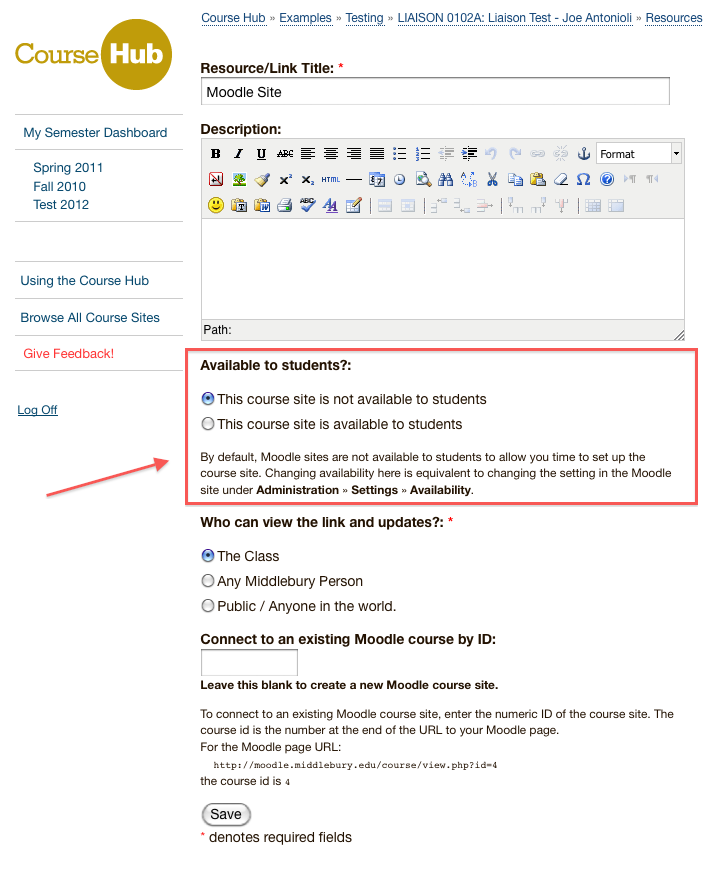
By default, when you create a Moodle site it is set to be “not available to students” to give you time to add site content before students can access the site.

Unfortunately, the “availability” setting can be a bit hard to find in Moodle settings. To make this important setting easier to change and its current state more visible, you can now set its value from right in the Course Hub when creating or editing the Moodle Resource:
About Adam Franco

Senior Application Developer

One Response to Change Moodle site availability from the Course Hub

  1. Carrie Macfarlane says:

    This is a GREAT improvement! Thanks, Adam!

Leave a Reply

Your email address will not be published. Required fields are marked *

You may use these HTML tags and attributes: <a href="" title=""> <abbr title=""> <acronym title=""> <b> <blockquote cite=""> <cite> <code> <del datetime=""> <em> <i> <q cite=""> <strike> <strong>